RSS 2.0 Feed
RSS 2.0


Atom 1.0 Feed
Atom 1.0

  Disabling Auto-Complete on ASP.NET Forms 

Popular browsers, such as Internet Explorer and Firefox support something called Auto-Complete. You've seen this many times. You go to a online form and as you start to type in fields you get a drop-down showing values you've typed in that field before. This feature can be turned off, but it really is a useful feature and can save you a lot of typing when entering redundant values.

As a web developer, you have to be conscious of the fact that the user's browser will likely have auto-complete turned on and be responsible enough to act accordingly. If you have a form that where the user could possibly enter private or secure values you need to be mindful that if the user is on a public computer that these values will be cached by the browser and seen by other users of that computer. You are able to control if the browser uses AutoComplete for your form or for specific values with just a small & simple tweak.
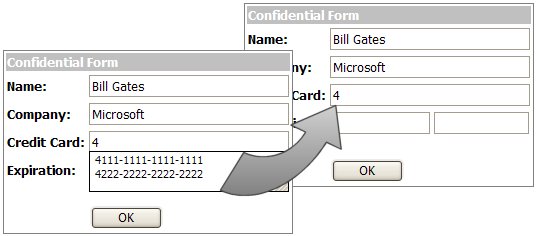
To turn off auto-complete for your entire form, all you need to do is add an attribute to your form tag, like this:

<form id="Form1" method="post" runat="server" autocomplete="off">

Easy enough. Now you won't get the auto complete on any of the controls on the form, works for any browser that supports auto-complete. The HTML INPUT tags also support the use of autocomplete=off and since the <asp:TextBox />control renders as INPUT tags then you can use it to set it on a control by control basis. Just add it to the TextBox at design-time (but note that VS.NET will underline it with a squiggly saying that textbox does not have an attribute for autocomplete - but it will still work):

<asp:TextBox Runat="server" ID="Textbox1" autocomplete="off"></asp:TextBox>

or at runtime:

Textbox1.Attributes.Add("autocomplete", "off");


Leave a comment below.

Comments

  1. Jonathan Chan 5/26/2005 10:02 AM
    Gravatar
    Exactly what I was looking for - thanks a lot
  2. Eve 8/24/2005 9:44 PM
    Gravatar
    Thanks! It helped me too, as the distance between the autocomplete box and the textbox was too big. I couldn't change that, so I needed to turn it off.
  3. Syed Murtaza Hussain Rizvi 1/6/2006 1:07 AM
    Gravatar
    Very nice article... one thing i should mention here that if autocomplete feature is not turned off in a webpage then javascript will not run on some events like on change.So it is must be turned off on such pages performing some mathematical function or some string manipulation.
  4. ismael 1/14/2006 10:58 AM
    Gravatar
    Yes, this is exactly what I needed!
  5. Louise 3/9/2006 1:27 AM
    Gravatar
    Thanks!! i have been googling this problem for a while and your note about VS.net underlinign it really helped as well :)
  6. quitchat 3/27/2006 12:32 AM
    Gravatar
    Very useful small Tip.Thank you.
  7. Donna 5/2/2006 11:34 AM
    Gravatar
    I also spent allot of time googling to find the solution. I can't Thank You enough!
  8. msn 5/23/2006 2:37 PM
    Gravatar
    Thank You for a very useful tip.
    Happy Coding
  9. Abu Mohammad Shoyeb 6/27/2006 8:39 PM
    Gravatar
    very much thanks for ur help
  10. daralick 8/15/2006 7:47 AM
    Gravatar
    I had been playing in the asp:textbox autocomplete="none" which wasn't doing the trick. Thanks for sharing...
  11. roopa 9/18/2006 6:41 AM
    Gravatar
    Hi

    I am trying to enable autocomplete , when its off on IE .

    Could u please help
  12. abc 9/18/2006 6:43 AM
    Gravatar
    Hi

    I am trying to enable autocomplete , when its off on IE .

    Could u please help
  13. Mahesh 10/19/2006 12:22 PM
    Gravatar
    Thanks for the artcle.
  14. Adrian Stannard 10/24/2006 2:55 AM
    Gravatar
    autocomplete="off" doesn't appear to work with firefox!
  15. Ryan Farley 10/24/2006 6:34 AM
    Gravatar
    Hi Adrian,

    It works for me in Firefox.

    -Ryan
  16. Jeff 11/29/2006 7:36 AM
    Gravatar
    For the people trying to turn it on I would think you would realize that some people find it really irritating and that as a security hole should not be able to be turned on from the other side.
  17. James 3/3/2007 7:07 PM
    Gravatar
    THANKS. I too have been googling all over for ways to prevent a credit card number from "replayed" on subsequent visits.
  18. nak 3/24/2007 5:05 AM
    Gravatar
    autocomplete property not found for asp:TextBox
  19. Ryan Farley 3/24/2007 7:00 AM
    Gravatar
    nak,

    This is mentioned in the article. The TextBox control renders as a HTML INPUT element, and the autocomplete attribute is carried over to that.

    From the article above:

    "Now you won't get the auto complete on any of the controls on the form, works for any browser that supports auto-complete. The HTML INPUT tags also support the use of autocomplete=off and since the <asp:TextBox />control renders as INPUT tags then you can use it to set it on a control by control basis. Just add it to the TextBox at design-time (but note that VS.NET will underline it with a squiggly saying that textbox does not have an attribute for autocomplete - but it will still work)"

    -Ryan
  20. Ed DeGagne 4/20/2007 7:11 AM
    Gravatar
    What makes implementing autocomplete on a field by field basis even more frustrating is that if you use ASP.NET controls, you have the ability to set the AutoCompleteType to one of many possible values (an enumeration).

    What happens in IE is that this is implemented by adding a vcard_name=[type] attribute behind the scenes (look at page source). There is even an enumeration for AutoCompleteType.Disabled, which adds the appropriate autocomplete="off" attribute for you.

    Unfortunately, it only works in IE as it is not even output for any other browser.
  21. Ed DeGagne 4/20/2007 10:48 AM
    Gravatar
    The culprit is that unless an actual form submit is fired, then IE will not save your autocomplete values. In my case, I am using linkbuttons and they do not fire a form submit.

    A fix is to override the __doPostback javascript function to get autosave values to save.

    Ex:

    var theform;
    if (window.navigator.appName.toLowerCase().indexOf("netscape") > -1) {
    theform = document.forms["Form1"];
    }
    else {
    theform = document.Form1;
    }

    // Override the base __doPostBack function
    var orig_doPostBack = __doPostBack;

    function pd_PostBack(Param1, Param2)
    {
    // If IE, we need to explicitly run AutoComplete
    // so form values are remembered.
    if (document.all)
    {
    window.external.AutoCompleteSaveForm(theform);
    }

    // Set back to original __doPostBack.
    __doPostBack = orig_doPostBack;
    __doPostBack(Param1, Param2);
    }
    __doPostBack = pd_PostBack;


    I also had another jscript function that needed to be overidden as well:

    // Override the base WebForm_DoPostBackWithOptions function.
    var orig_WebForm_DoPostBackWithOptions = WebForm_DoPostBackWithOptions;

    function pd_DoPostBackWithOptions(options)
    {
    // If IE, we need to explicitly run AutoComplete
    // so form values are remembered.
    if (document.all)
    {
    window.external.AutoCompleteSaveForm(theform);
    }

    // Set back to original WebForm_DoPostBackWithOptions.
    WebForm_DoPostBackWithOptions = orig_WebForm_DoPostBackWithOptions;
    WebForm_DoPostBackWithOptions(options);
    }
    WebForm_DoPostBackWithOptions = pd_DoPostBackWithOptions;


    This solver the issue for me and was based (and tweaked for my instance) from a MSDN article highlighting the fact that the autosave values are only saved on a submit form.

    Folks, this is an IE only issue.
  22. Tom 5/2/2007 8:10 PM
    Gravatar
    > AutoCompleteType.Disabled, which adds the appropriate
    > autocomplete="off" attribute for you
    >
    > Unfortunately, it only works in IE as it is not even
    > output for any other browser.

    Thanks for confirming this for me. Driving me nuts figuring out why "AutoCompleteType = Disabled" wasn't working in Firefox.

    However, hard coding AutoComplete = "off" works great!
  23. David M. 6/4/2007 2:02 PM
    Gravatar
    Thnaks!
  24. David Homer 11/30/2007 12:36 AM
    Gravatar
    Neat!

    Thanks, like Tom I was expecting that in the code behind the oTextBox.AutoCompleteType=AutoCompleteType.None would actually work in IE :) obviously not
  25. Peter 6/19/2008 6:03 AM
    Gravatar
    This works great. It's a pity it breaks XHTML validation though...
  26. Dhiraj Kumar Singh 7/31/2008 10:50 AM
    Gravatar
    This Solution is very Good and I suggest to use this Solution if u want such type of facility
  27. Matthew Trujillo 9/9/2008 1:29 PM
    Gravatar
    I found a simple solution for this. Instead of adding an attribute to each field, you can add it to the form.

    Form.Attributes.Add("autocomplete", "off")

    Just wanted to make sure this was simple for even the novices to understand.
  28. Boleslav 9/27/2008 2:39 PM
    Gravatar
    Thanks! Greate solution for fixing LinkButtons postbacks in ASP.NET. Brilliant catch!
  29. Arthur 10/2/2008 1:29 PM
    Gravatar
    Thank you! :)

Leave a comment

Please be polite and on topic. Your e-mail will never be published.

Please add 3 and 5 and type the answer here:


News


Also see my CRM Developer blog

Connect:            

Sponsor

Sections